My self-hosted music library with Remo
How I use Youtarr, Navidrome, and Amperfy to keep music on my server and listen on my phone.

A lot of the music I listen to is on YouTube, including remixes and individual uploads I cannot find on Spotify.
For a while I used YouTube in Brave on my iPhone. It worked, but it was slow and background playback was unreliable. Sometimes I had to leave the phone unlocked for the next song in a playlist to start. I mostly listen in the car, so that got annoying.
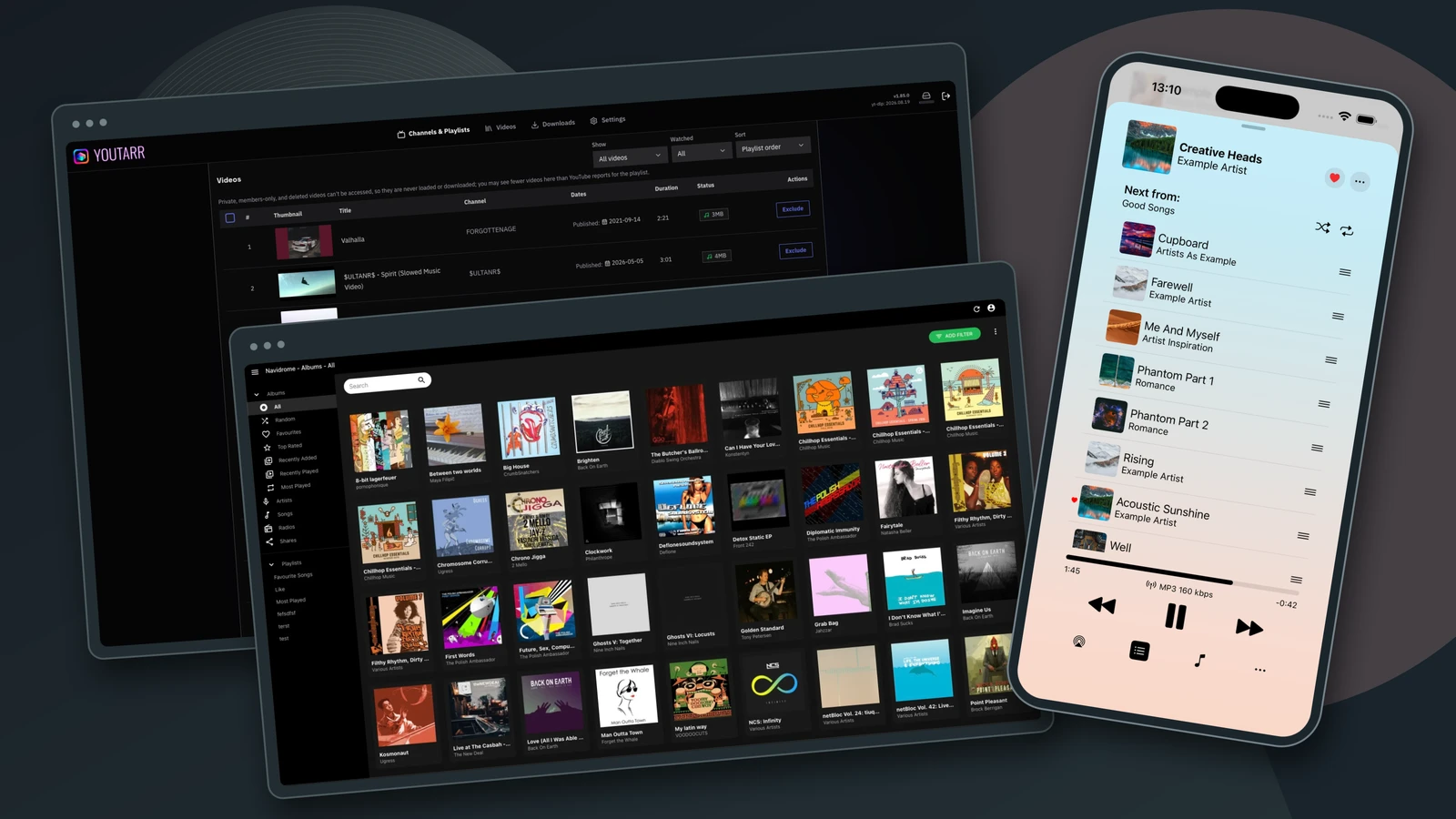
Now I download those playlists to my home server and listen through Amperfy on my phone. Changing songs is quick, I can leave the screen off, and cached music plays with both Wi-Fi and mobile data off. The downloaded files stay on my server even if the original uploads disappear from YouTube.
The components
I have created a Docker Compose setup called Remo that brings the server
components together. I run it in a Debian 13
A home server is not required. You can also host Remo on a
On the server
- Youtarr follows YouTube playlists, downloads their audio as MP3s, and creates
M3UA text-based playlist format that lists paths or URLs to media files. It contains references to the songs, not the audio itself. playlist files. - Navidrome scans the downloaded files, imports the playlists, and serves the music to listening apps. Its access to the music folder is read-only.
- Shared music folder (
media/youtube/) holds the downloads. Both apps use the same files, so there is no separate copying step between them. - MySQL stores Youtarr’s application data. The music files stay in the shared folder.
- Caddy receives requests from the browser and phone. It sends requests under
/navidrometo Navidrome and other paths to Youtarr, so both apps share one HTTP port.
Diagram source
flowchart LR
    yt["YouTube playlists"]
    subgraph vm["Home server · Debian VM"]
        y["Youtarr"]
        db[("MySQL<br/>Youtarr database")]
        files[("Shared folder<br/>MP3s and M3U playlists")]
        n["Navidrome"]
        y <-->|"Database queries"| db
        y -->|"Writes downloads"| files
        files -->|"Scans and reads"| n
    end
    yt -->|"Downloads over HTTPS"| y
The diagram could not load. Its source is available above.
On the phone and router
- Amperfy runs on my iPhone. It uses the Subsonic
APIApplication programming interface – a defined way for programs to request data or actions from each other. to browse and play music from the server, and caches songs for offline listening. - WireGuard provides
VPNVirtual private network – here, an encrypted tunnel from a device to the network where the music server runs. access to the server. I use it for both phone and browser access, even when at home. Its server runs on my home router, a UniFi Cloud Gateway Max, outside Docker Compose. A UniFi router is not required; a Linux machine or another compatible router works too.
Diagram source
flowchart LR
    phone["iPhone · Amperfy"]
    gateway["Home router · UniFi<br/>WireGuard server"]
    browser["Browser<br/>Device connected to VPN"]
    subgraph vm["Home server · Debian VM"]
        c["Caddy<br/>HTTP entry point"]
        n["Navidrome<br/>Library and audio"]
        y["Youtarr<br/>Download management"]
        c <-->|"/navidrome"| n
        c <-->|"Other paths"| y
    end
    phone <-->|"Encrypted WireGuard tunnel"| gateway
    gateway <-->|"HTTP over the home network"| c
    browser <-->|"Encrypted WireGuard tunnel"| gateway
The diagram could not load. Its source is available above.
Cached music plays without a connection to the server or VPN.
Server setup
Start with Git and Docker with the Compose plugin installed. Your server needs a stable address and a free HTTP port (80 by default).
1. Download the project
git clone https://github.com/Luksys3/remo.git
cd remo
2. Configure Remo
Copy the example configuration:
cp .env.example .env
chmod 600 .env
Open .env in your editor and set:
PUID: the number printed byid -u.PGID: the number printed byid -g.TZ: your timezone. The example usesEurope/Vilnius.HTTP_PORT: keep80, or choose another free port such as8080.DATABASE_PASSWORD: a strong password for the database.YOUTARR_ADMIN_USERNAME: your Youtarr login name. The default isadmin.YOUTARR_ADMIN_PASSWORD: a different strong password for that login.
Use your password manager or another tool to generate the passwords.
openssl rand -hex 24 is one option, not a requirement. You can leave
DATABASE_NAME and NAVIDROME_SCAN_SCHEDULE at their defaults.
The URLs below assume port 80. If you use HTTP_PORT=8080, add :8080 after
<VM-IP> in each address: http://<VM-IP>:8080/ for Youtarr and
http://<VM-IP>:8080/navidrome for Navidrome.
Use the Navidrome URL as the server address in Amperfy.
3. Start the services
The Linux user whose IDs you entered as PUID and PGID must own data/
and media/. Cloning the repository as that user gives the initial directories
the right ownership. Then start the services:
docker compose up -dOpen http://<VM-IP>/navidrome and create the Navidrome admin account before
downloading music. Then open Youtarr at http://<VM-IP>/
and log in with the username and password you set in .env.
4. Configure downloads and add playlists
In the Youtarr web interface:
- In Settings, add
--embed-thumbnailto the custom yt-dlp arguments so each MP3 includes the video’s thumbnail as cover art. Set this before downloading any MP3s. - In Settings, enable Automatically update yt-dlp to get download fixes automatically. Keep Update Channel set to Stable (recommended).
- Add a YouTube playlist and choose MP3 Only to save audio without video.
- Enable Auto-download new videos to pick up future playlist additions.
- For the initial download, open the playlist, select the videos you want, and click Download Selected.
Phone apps
Download Amperfy from the App Store.
Add a Subsonic server at http://<VM-IP>/navidrome using a Navidrome account.
You can create a non-admin account for listening.
In the Amperfy app, you can browse playlists, find music by artist, or search your library. I mostly use playlists, but sometimes browse by artist or search for a specific song. Artists in this library usually correspond to YouTube channels.
For Android, Ultrasonic is a free, open-source client that lists Navidrome among its supported servers. I have not verified or tested this setup on Android.
VPN setup
A VPN is optional, even for remote access. You could instead configure public
HTTPS access through a
I use a VPN to reach my home network without forwarding the music server’s HTTP port on the router. Port forwarding would expose the apps directly to the internet, whereas WireGuard’s key-based authentication restricts access to configured devices. Someone on the internet would need a valid client key for my WireGuard server before they could reach the apps to try passwords or exploit software vulnerabilities.
If you use UniFi, follow Ubiquiti’s setup guide to create the server in UniFi’s VPN section. Add a client for each device, then import its configuration file into the WireGuard app.
Traffic inside the WireGuard tunnel is encrypted up to my home router, including the music apps’ HTTP traffic. The connection from the router to the VM still uses unencrypted HTTP. I may add HTTPS to the Docker Compose setup later.
Troubleshooting
One day, downloads started failing with Temporary failure in name resolution.
The VM could look up YouTube’s address, but the Youtarr container could not.
Restarting the container restored downloads:
docker compose restart youtarrI still do not know what caused the
Results and next steps
At the time of writing, I have only used this setup for a few days. It has worked well for listening in the car, but I cannot judge its long-term reliability yet.
I still find new music on YouTube and add it to a playlist that Youtarr follows. Amperfy cannot search YouTube, which is fine because I do not do that while driving. I would also like to try listening to podcasts through this setup.
Backups are the main unfinished part. I have not set them up yet, so losing
the server’s data would still mean losing my library. I need to back up the music in
media/youtube/, the app state in data/, and Youtarr’s database volume.
Owning the files also means looking after the storage, updates, and backups.
- #youtube
- #youtarr
- #navidrome
- #amperfy
- #docker
- #wireguard
I used an AI assistant to help turn my notes into this post. I reviewed the final text and remain responsible for any errors.